Eufy Pan Tilt Indoor Camera: Worth It for Pets?
The eufy Security Indoor Cam E220 packs pan-and-tilt control, pet tracking, sound alerts, and two-way talk into a small wired camera.
Affiliate disclosure: As an Amazon Associate I earn from qualifying purchases. This article may contain affiliate links, which means I may earn a commission at no extra cost to you.
The eufy Security Indoor Cam E220 makes a lot of sense if one fixed camera angle is not enough. I set it up, moved it around the room from the app, tried its tracking, and went through the alert settings. For pet and baby monitoring, this eufy pan tilt indoor camera brings a lot of useful control into a very small wired unit.
A strong compact wired camera for pet owners and parents who want room coverage and configurable alerts. The pan-and-tilt controls, tracking, pet commands, and sound options stand out, but plan for wired power and add a microSD card if you want local 2K recording.
As an Amazon Associate I earn from qualifying purchases.
| Camera type | Compact wired indoor pan-and-tilt camera |
|---|---|
| Coverage | 360° pan-and-tilt positioning stated in setup |
| Video options | 2K or Full HD recording options |
| Best for | Pet, baby, and general indoor room monitoring |
| Placement | Table, shelf, wall, or ceiling; upside-down mounting supported |
| Storage note | No microSD card included in Scott's setup |
The short version: I liked it. It is compact, setup was straightforward, and the app gives you far more control than a basic indoor camera. You can choose people, pets, or all motion; choose crying detection or all sound; adjust sensitivity; steer the camera yourself; and let it track movement. That is a practical feature stack for a kid’s room, a pet area, or a general living space.
Who should buy this eufy pan tilt indoor camera?
I would look at the E220 if you want one indoor camera to cover more than one corner of a room. A stationary camera is fine when the crib, kennel, or doorway never moves out of frame. Real life is usually messier than that. A pet walks behind the couch. A toddler ends up on the other side of the room. Pan and tilt gives you a way to check without needing a second camera right away.
It is a particularly sensible fit for:
- Parents who want configurable movement and sound notifications in a baby’s room.
- Pet owners who want to check in, talk to a pet, or use a selected zone for a pet command.
- Anyone who wants a compact indoor camera that can sit on furniture or mount to a wall or ceiling.
- Users who do not mind spending a few minutes in an app dialing in notifications and sensitivity.
I would skip it if you specifically need a battery-powered camera. This one needs to stay plugged in. Also, if local recording is part of your plan, budget for a microSD card because one was not included in my setup.
Setup was simple, and the mounting options are useful
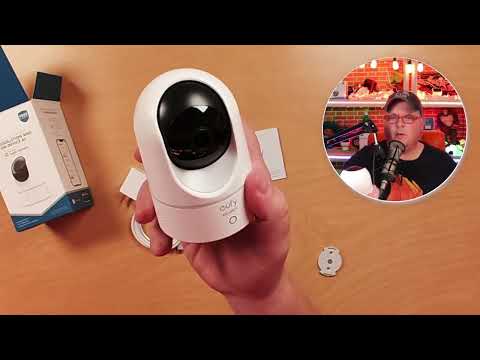
In the box, I found the camera, power adapter, a long micro-USB cable, mounting bracket, positioning-guide sticker, screws, and wall anchors. The lens arrived with a protective film, so remove that before judging the picture. Small detail, big difference.
The camera itself is small enough to disappear on a dresser, shelf, or entertainment center. That is probably where most people will use it. But the mount is worth having. You can install it on a wall or ceiling, including upside down. That flexibility matters if you are trying to keep a cord away from a child or get a better angle over a pet area.
I paired it in the eufy Security app by choosing the wired pan-and-tilt camera category, scanning the QR code on the bottom, pressing the rear Sync button, and entering Wi-Fi information. I named the camera, selected notification preferences, skipped the microSD setup because I had no card installed, and completed the firmware update successfully.
That is the right order of operations: get it connected, update it, then decide where it lives. Do not permanently mount it before you have looked at the live view from your intended location. A few inches can make the difference between seeing the whole room and staring at the top of a chair.
Pan, tilt, and tracking are the real reason to buy it
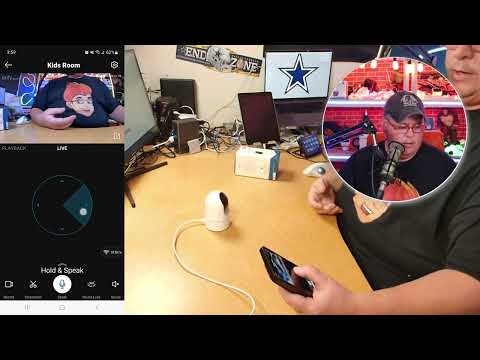
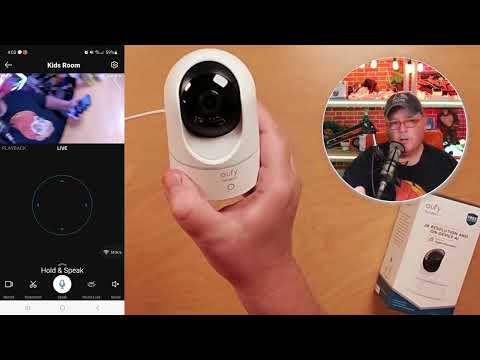
The E220 is presented with 360-degree pan-and-tilt coverage, 2K video, and 4x zoom. In live view, I could use the on-screen controls to move it up, down, and around the room. I also adjusted the movement speed, and the fast setting was noticeably quicker.
There is one practical nuance: manual movement reaches a directional limit. In use, it felt like a point-A-to-point-B movement system rather than endlessly spinning in one direction. That is not a deal-breaker. It is simply how you should think about it when placing the camera.
I also watched the camera pan around the room automatically without me touching the phone. For a quick room check, that is useful. You can capture a screenshot from live view or record a clip directly to your phone album, too. Those are handy little tools when you want to save a moment without digging through recordings.
AI tracking worked with my hand: the camera repositioned toward the movement. That can be genuinely helpful for a roaming pet or a child moving across the room. I would leave tracking on initially, then adjust it only if it becomes more active than you want in your own space.
The alert controls are built for pets and babies
This is where the E220 gets more interesting than a simple room camera. Under motion detection, I could choose human, pet, or all motion and adjust sensitivity from low to high. That means you can tailor the camera to the job instead of accepting every little movement as an event.
For example, a small cat constantly crossing the room may not need the same alert settings as a baby monitor. Start with a reasonable sensitivity, live with it for a bit, and then tune it. There is no magic setting that works in every room.
Sound detection offers the same kind of flexibility. I could choose crying detection or all sounds, then adjust sensitivity. For a nursery, crying detection is the obvious starting point. For a pet area or playroom, all sounds may make more sense if you want notice of unusual noise or activity.
The pet-command tool is the unusual feature here. You define an activity zone, such as a couch, and the camera can play a command when it detects a pet in that selected zone. I created a custom spoken command during setup. It is not a substitute for training—nothing is—but it is a clever automated reminder for a repeated behavior.
Just keep expectations grounded. The feature depends on the activity zone being configured well and the camera recognizing the pet in that zone. Good placement matters.
+ Pros
- Compact design with tabletop, wall, and ceiling mounting options
- Pan-and-tilt controls, automatic room panning, and AI tracking cover more of a room
- Motion alerts can target people, pets, or all motion with adjustable sensitivity
- Crying detection and all-sound alerts add useful baby-monitoring flexibility
- Pet-command activity zones offer a targeted automated reminder
- Two-way talk and a loud manual alarm are useful live-view tools
− Cons
- Uses micro-USB power instead of USB-C
- Requires wired power
- No microSD card was included in Scott's setup
- Alarm must be manually triggered
- Cloud storage supports Full HD rather than 2K, according to the settings shown
Two-way talk and the alarm are useful, but different tools
I used the Talk button in the app and spoke through the camera. Two-way audio is simple but practical: tell the dog to get off the couch, check in with someone at home, or give a quick verbal cue from another room.
The alarm is loud. I manually triggered it, and it would definitely get attention inside a house. But it is a manual 30-second alarm, not an automatic response to detected motion. That makes it more of a deliberate intervention feature than a hands-off security siren.
That distinction matters. If you want to scare off an intruder automatically, this is not the behavior I would expect from the E220. If you want a loud alert you can activate while watching live view, it does the job.
Recording and video settings: know the storage tradeoff
The app gives you control over night vision, timestamp, logo overlay, streaming quality, recording quality, audio, and notifications. For streaming, I saw auto, high, medium, and low choices. Auto is the sensible default unless your connection gives you a reason to change it.
For recording, there are 2K and Full HD options. I was told cloud storage supports Full HD only, while 2K recording is available with an SD card. Since I did not install a microSD card, I skipped local-storage setup.
That creates a straightforward buying decision. If 2K local recording is important to you, add a compatible microSD card. If you are fine with the cloud recording limitation described in the app settings, Full HD is the cloud option presented here. Either way, make the storage choice before you assume every setting works the same way.
I also saw options for automatic night vision and for turning overlays on or off. I would generally leave night vision on Auto for an indoor camera. The timestamp and logo are preference settings: useful for documentation, unnecessary if you want a cleaner image.
Specs
| Spec | Detail |
|---|---|
| Product | eufy Security Indoor Cam E220 |
| Power | Wired power with included micro-USB cable and adapter |
| Camera control | Remote pan and tilt through the eufy Security app |
| Stated video resolution | 2K |
| Stated zoom | 4x |
| Recording quality choices | 2K or Full HD |
| Streaming quality choices | Auto, High, Medium, or Low |
| Detection options | Human, pet, or all motion; crying or all sound |
| Audio | Two-way talk |
| Alarm | Manual 30-second alarm |
| Included mounting items | Bracket, positioning guide, screws, and wall anchors |
What I would set up first for a pet or nursery
Do not turn on every alert at maximum sensitivity and then wonder why your phone will not stop buzzing. Start simple.
- For pets: Choose pet motion detection, turn on tracking, set a sensible sensitivity, and create a pet-command activity zone only where it is needed.
- For a nursery: Use crying detection or all sound depending on what you want to catch, keep night vision on Auto, and decide whether audio recording belongs in your setup.
- For general room coverage: Place it where its pan-and-tilt range can see the key areas, then use live view and the automatic pan to check the room.
Also, run the firmware update during initial setup. I did, and it completed successfully. It is one of those boring five-minute tasks that is easier to do before the camera becomes part of your daily routine.
Scorecard
QR pairing and firmware update were straightforward.
Pan, tilt, automatic room panning, and tracking add flexibility.
Detection categories, sound alerts, and pet commands are unusually configurable.
Works on furniture or mounted on a wall or ceiling.
Wired micro-USB power and separate microSD storage are the tradeoffs.
FAQ
Can the eufy Security Indoor Cam E220 be mounted upside down?
Yes. I went through the placement choices in the app and the camera can be placed on a table or shelf, mounted on a wall, or installed on a ceiling upside down. Mounting hardware and a positioning guide are included.
Does the E220 track pets?
It has pet motion detection, AI tracking, adjustable sensitivity, and a pet-command feature tied to an activity zone. I demonstrated AI tracking as the camera repositioned toward my moving hand.
Does the E220 have an automatic alarm?
No. The alarm I used was manually triggered in the app and ran for 30 seconds. It was loud, but it does not automatically sound when motion is detected.
Can it record in 2K?
The recording settings offered 2K and Full HD. I was told 2K is available with an SD card, while cloud storage supports Full HD only. I did not install a microSD card during my setup.
Does it use USB-C power?
No. The included power cable is micro-USB. The cable was fairly long, which helps with placement, but USB-C would have been the more current choice.
Final recommendation
The eufy Security Indoor Cam E220 is a good buy for someone who wants more coverage and more alert control than a basic fixed indoor camera provides. I liked the small footprint, easy app pairing, flexible mounting, responsive pan-and-tilt controls, tracking, sound options, and two-way talk. The pet-command feature is also a nice extra for the right household.
The compromises are clear rather than hidden: it needs wired power, it uses micro-USB, the alarm is manual, and a microSD card is the route to local 2K recording. If those fit your setup, this is a capable little camera for keeping an eye on pets, kids, or a main room.
As an Amazon Associate I earn from qualifying purchases.