FIFINE D6 Stream Deck Alternative: The Cable Is Smart
The FIFINE AmpliGame D6 makes a strong first impression with tactile buttons, a stable one-piece build, RGB control, and a genuinely useful USB-C-to-USB-A cable adapter.
Affiliate disclosure: As an Amazon Associate I earn from qualifying purchases. This article may contain affiliate links, which means I may earn a commission at no extra cost to you.
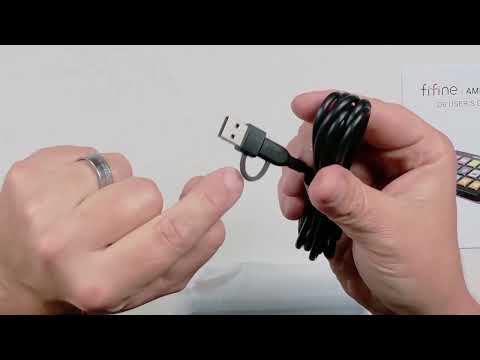
The FIFINE AmpliGame D6 gets the physical fundamentals right for a compact Stream Deck alternative. In my hands, it felt like a single solid unit, its buttons gave a clear tactile press, and the rubberized underside was designed to keep it from moving around on the desk. The standout detail, though, was the included cable: it has a USB-C-to-USB-A converter built into it. Since my computer does not have enough USB-C ports, that small decision saved me from finding and buying a separate adapter.
That does not make the D6 automatically right for every stream setup. A programmable controller only becomes useful after its buttons are assigned to the actions you need. I powered this one on and checked its physical controls and lighting, but I did not program macros or test particular streaming integrations. My takeaway is therefore hardware-first: this is an appealing Stream Deck-style controller if its software fits your planned workflow, and the cable design is a real everyday convenience for USB-A desktop users.
The FIFINE AmpliGame D6 is a promising compact Stream Deck alternative with tactile controls, a solid desk-friendly build, and an unusually useful included USB-C-to-USB-A cable. Its real value depends on whether its programming software fits your workflow, so check that before buying.
As an Amazon Associate I earn from qualifying purchases.
| Product type | Compact programmable stream controller |
|---|---|
| Connection | USB-C |
| Adapter convenience | Built-in USB-C-to-USB-A converter on included cable |
| Control feel | Tactile physical buttons |
| Desk stability | Rubber underside pads |
| Lighting | Rear-button RGB mode control |
My first hands-on take on the FIFINE D6
I opened the box before using the controller. Inside, I found the D6, a user guide, the cable, and an additional small item or insert that I could not identify. The unidentified item is not something I can assign a purpose to, but the main setup pieces were clear enough: the controller connects by USB-C, and the cable is made to accommodate more than one common computer-port situation.
The cable was the first thing that genuinely stood out. At the controller end, it uses USB-C. At the computer end, it includes a built-in converter that lets me connect to a standard USB-A port. That matters more than it may sound like it does. My computer is short on USB-C ports, and I have dealt with the nuisance of needing a separate converter for another competing device. With the D6 cable, I did not need to locate an adapter, spend extra money on one, or add a separate little piece that can be misplaced.
For a desktop accessory that may stay connected all the time, cable convenience is part of the product experience, not an afterthought. A separate adapter can work perfectly well, but it is another item to purchase and manage. Here, the conversion piece is part of the cable I already need to use. Buyers with an open USB-C port may not care much about that advantage. Buyers using a USB-A-heavy desktop, older computer, or crowded port layout should care. It reduces one barrier between opening the box and getting the controller connected.
The controller itself made a reassuring first impression. It appeared to be one piece, and while handling it I did not find something that seemed loose, detachable, or ready to pop free. I like that in a device designed for repeated reaching, tapping, and pressing. A compact command deck should feel uncomplicated when it sits beside a keyboard, microphone, camera controls, or other streaming equipment. The D6 felt cohesive rather than delicate.
The buttons also delivered the kind of response I want from physical controls. They were easy to use, and I could feel the press when I pushed one. That tactile feedback is a practical benefit, not merely a preference about button feel. When I am using a control device, I want some confirmation from the button itself that I have actually made an input. A touch interface can look clean, but a physical press is often easier to recognize without looking directly at the unit.
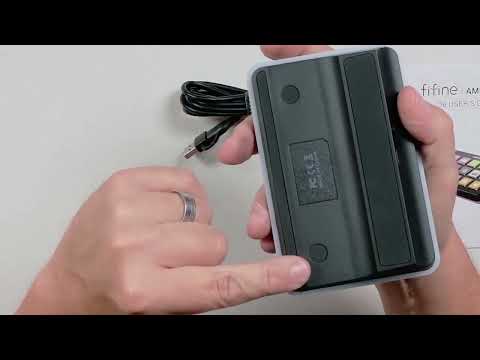
On the underside, I noticed rubber pads around the controller. Their purpose is to help stop it from sliding while it is on a desk. I did not conduct a long-term desk-stability test, but the pads are a sensible inclusion for something meant to be pressed repeatedly. A controller that shifts away every time I reach for it would be irritating quickly. The D6 is built with that basic desk-use concern in mind.
Why the included cable matters in a Stream Deck alternative
It would be easy to focus only on the D6’s buttons and treat the cable as a box-checking accessory. I think that would miss one of this controller’s most buyer-relevant details. The included USB-C-to-USB-A conversion is particularly useful because a control deck is not a product I want to troubleshoot at the port level. If I have a USB-A port available, I can use the included cable instead of sourcing another accessory first.
That is the kind of design choice that fits the practical appeal of a compact Stream Deck alternative. These devices are supposed to simplify access to commands once configured. Starting with an adapter hunt works against that feeling. In my case, the integrated solution was immediately helpful because USB-C availability on my computer is limited. It also keeps the connection arrangement neater than using a separate converter between a cable and the computer.
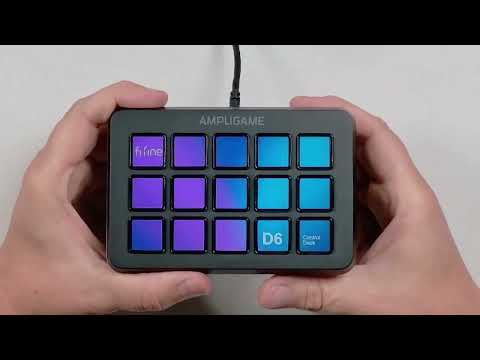
There is an important boundary to that praise. The cable makes physical connection easier; it does not remove the need to configure the deck. After connecting the D6 to my computer, it powered on and displayed “FIFINE” and “Control Deck.” That confirmed the unit was receiving power and starting up. It did not mean that the keys were already ready for my specific stream or desktop tasks.
I want to be especially clear about this because it helps separate setup convenience from workflow readiness. Like other programmable controllers, the D6 needs programming before its buttons carry out assigned actions. The product is not intended to guess whether I want a key to mute a microphone, open an application, switch a scene, or do something else. Before buying any deck in this category, I would decide what I want it to control and then make sure the available software support covers those needs.
I did not test specific macros, scene changes, OBS controls, profiles, folders, application launching, or button-display customization. I also cannot make a claim about the breadth of compatibility or long-term software reliability. If one particular integration is essential to your setup, confirm it before purchase rather than assuming that a Stream Deck-style form factor guarantees the same workflow support as every competing controller.
Power-on behavior and the D6 RGB lighting control
Once connected, the D6 lit up and showed its startup wording: “FIFINE” and “Control Deck.” It is a simple moment, but it gives the controller a finished, purpose-built feel rather than making it seem like an anonymous keypad. From there, the next meaningful part of ownership is software installation and command setup. That is where a programmable deck becomes personal to the way its owner works.
I also found a button on the back of the unit and pressed it to see what it did. Each press changed the lighting look, cycling through different built-in RGB effects or modes. I could move the controller into a darker-looking lighting state and then continue through other looks by pressing the rear control. The visual change was immediate and easy to understand.
Placing that lighting control on the back is a decision I appreciate. RGB is a cosmetic adjustment, while the front controls are the area I would want reserved for working commands after programming. Keeping lighting changes separate means the deck’s main face can stay focused on shortcuts instead of giving up a primary position to a color setting. For someone who likes a coordinated desktop setup, it is a quick way to alter the controller’s vibe. For someone indifferent to RGB, it stays out of the way.
I cannot say from my handling whether that rear button serves only as the RGB control or has another function as well. What I observed is straightforward: pressing it repeatedly changed the built-in lighting appearance. That makes it useful as a direct physical lighting adjustment without requiring me to dig through a screen menu just to change the look of the device.
+ Pros
- Included cable has a built-in USB-C-to-USB-A converter
- Solid one-piece feel with no loose parts noticed
- Tactile buttons provide clear press feedback
- Rubber underside pads help it stay put on a desk
- Rear button quickly cycles RGB lighting looks
! What to know
- The controller needs programming before the buttons perform assigned actions.
- Confirm its software support matches the shortcuts and integrations you need.
- The rear button changes the lighting look, keeping that cosmetic control off the main button area.
Who the FIFINE D6 makes sense for
I would consider the D6 if I wanted a compact programmable control deck for a streaming desk, a recording setup, or general desktop shortcuts and I valued a simple physical interface. Its tactile buttons are well suited to someone who wants a distinct press rather than a flat touch control. The one-piece feel and rubber pads also make sense for a controller that will live within easy reach and get pressed throughout a session.
The most obvious buyer is someone with USB-A ports available but limited USB-C access. That is exactly the situation where the integrated converter made a difference for me. Instead of treating a USB-C connection as a compatibility problem, the included cable offers a direct path to a normal USB-A computer port. It is a modest feature, but it may be more useful in daily setup than decorative extras.
This controller may also appeal to buyers looking beyond a better-known Stream Deck-style option but who still want the familiar idea of programmable physical commands. The D6’s initial hardware experience was positive: it felt solid, stayed oriented toward desk use, and offered clear button feedback. Those are good foundations for a device whose purpose is to put frequently used actions closer at hand.
At the same time, I would not choose it solely because it looks like it belongs in the same category as other control decks. The software side should decide the purchase. Start by listing the actions you expect to assign. Consider whether those are streaming actions, desktop shortcuts, application controls, or a mix. Then verify that the D6 can support the relevant requirements in your environment. The correct controller is the one that fits the actual commands you need, not simply the one with the most appealing first physical impression.
What I would verify before buying the D6
My time with the D6 established several things clearly: I connected it, saw it power on, handled its buttons, checked its base, and used the rear lighting button. It did not establish every performance question a serious streamer might have. That distinction matters because programmable hardware can be excellent physically while still being a poor match for a particular software routine.
First, I would verify support for the specific commands I plan to use. I did not program the keys during this hands-on look, so I cannot personally confirm particular macro behavior, streaming-platform controls, OBS integration, scene switching, mute or volume actions, folder organization, profiles, or application-launch behavior. If any of those functions is central to your setup, check the current compatibility information and software options before you commit.
Second, I would distinguish initial build feel from durability. The D6 felt solid and did not have loose parts when I handled it, which is encouraging. But I did not use it long enough to make a long-term durability claim. Repeated daily button use, ongoing software updates, and compatibility across different computers are separate ownership questions from how the unit feels out of the box.
Third, be realistic about what “ready to use” means with a programmable controller. Plugging in the D6 got it powered up, but it needs programming before its buttons can carry out the commands I choose. That is normal for this product category and not a product-level fault. Still, buyers who want an instant fixed-function remote should understand that a control deck is designed around setup and personalization.
Finally, I would keep the cable advantage in proper perspective. It is a strong convenience feature for USB-A users, and it directly solved a problem on my computer. It is not a reason to skip checking the software. The best case is that the D6 gives you both: painless physical connection and the command support your workflow requires.
Specs
| Spec | Detail |
|---|---|
| Model | FIFINE AmpliGame D6 Stream Controller |
| Connection type | USB-C |
| Included cable | USB-C cable with integrated USB-C-to-USB-A converter |
| Lighting control | Rear button cycles built-in RGB lighting looks |
| Base | Rubber pads around underside |
| Out-of-box state | Requires programming for assigned actions |
How I scored the initial D6 experience
My score reflects a first hands-on hardware assessment, not a full software or long-term reliability evaluation. The build feel, tactile button response, integrated converter, underside pads, and easy RGB changes were all things I directly handled or observed. The absence of programming tests is why I would treat the overall recommendation as conditional on software fit.
The strongest category for me is connection convenience. The built-in USB-C-to-USB-A converter was more than a specification on a list: it addressed the limited USB-C capacity on my own computer. Build feel and button feedback also scored well because the unit felt cohesive and each press was noticeable. The lighting control is simple but effective, while the rubber pads are a welcome desk-oriented detail.
Scorecard
Felt solid and one-piece in hand.
Tactile presses make input easy to confirm.
Integrated USB-A converter is genuinely useful.
Rubber pads should help keep it planted.
Rear button makes RGB changes simple.
FIFINE AmpliGame D6 FAQ
Is the FIFINE D6 a Stream Deck alternative?
Yes. It is a compact programmable control deck in the same general category as Stream Deck-style devices. I liked the D6’s tactile buttons, solid one-piece feel, and practical cable design. The key buying question is whether its software supports the commands and integrations you need.
Does the FIFINE AmpliGame D6 use USB-C?
Yes. The controller connects through USB-C. Its included cable also has a built-in USB-C-to-USB-A converter, which let me connect it to a computer with a standard USB-A port without finding a separate adapter.
Does the D6 work immediately after connecting it?
It powered on when I connected it and displayed “FIFINE” and “Control Deck.” However, it needs to be programmed before the buttons can perform your chosen assigned actions. Connection and programming are separate parts of the setup.
Does the FIFINE D6 have RGB lighting?
Yes. I pressed the button on the back of the controller and watched it cycle through different built-in RGB lighting looks. The rear placement keeps that cosmetic control separate from the main button area.
Does the D6 slide around on a desk?
The underside has rubber pads around it that are intended to help keep the controller from sliding while you press the buttons. I did not conduct an extended stability test, but the pads are a useful desk-focused design feature.
Did I test OBS, macros, or scene switching on the FIFINE D6?
No. I did not program keys or test specific macros, OBS integration, scene changes, profiles, folders, or app-launch actions during this hands-on look. If those functions matter to your purchase, verify the current software support for your workflow first.
Final recommendation
The FIFINE AmpliGame D6 is worth considering if you want a compact Stream Deck alternative with a positive physical feel and a genuinely thoughtful connection solution. I liked that it felt like one solid piece, that its buttons made each press easy to recognize, and that its underside included rubber pads for desk use. The rear RGB button is also a straightforward way to adjust the lighting without crowding the main control surface.
The included cable is the product detail I would emphasize most. The integrated USB-C-to-USB-A converter solved a real issue for me because my computer does not have enough USB-C ports. If your computer is similarly limited, it can make the D6 easier to adopt than a controller that requires an additional adapter.
Just make the final buying decision based on your intended commands. The D6 needs programming, as a control deck should, and I did not test the software features that determine whether it can handle a particular streaming workflow. Confirm that side first. If it aligns with what you need to trigger, the D6’s physical design and included cable make a strong case for it as a tidy desktop controller.
As an Amazon Associate I earn from qualifying purchases.