eufy Solar Wall Light Cam S120: Setup and Motion Tips
The eufy Solar Wall Light Cam S120 was one of the easiest outdoor cameras I’ve set up. Its app controls are deep, but sunny placement and motion tuning matter.
Affiliate disclosure: As an Amazon Associate I earn from qualifying purchases. This article may contain affiliate links, which means I may earn a commission at no extra cost to you.
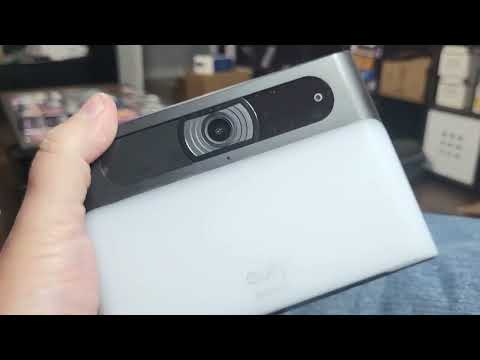
The eufy Solar Wall Light Cam S120 is a solar-powered outdoor camera for people who want a porch light and a camera in one unit, without making installation feel like a major project. I found it lightweight, straightforward to mount, and one of the easiest cameras I have set up. The bigger story, though, is the control available in the eufy app. I could adjust lighting, alarms, recording preferences, privacy masking, notifications, and several parts of motion detection.
That flexibility is especially important when the eufy Solar Wall Light Cam S120 faces a driveway or street. My camera points toward the street, where passing cars could easily become a source of needless events. Rather than treating that as unavoidable, I could turn off other-motion detection, set a more conservative sensitivity, and work with an activity zone. The camera gives you useful controls, but the mounting location still matters as much as the settings.
A strong choice for a sunny porch or entry where you want a wall light and camera with unusually flexible app controls. Setup was simple and the live view looked clear from roughly 7–8 feet up, but street-facing installs need careful motion tuning.
As an Amazon Associate I earn from qualifying purchases.
My eufy Solar Wall Light Cam S120 setup experience
I installed the S120 between window screens near my front porch. I do not have a lot of open mounting locations around my house, so that position made sense for the coverage I wanted. It also had the solar condition this product needs: very strong direct sun. I could see that the location gets a great deal of sunlight, and I expected it to receive substantial solar power there.
The unit itself did not feel large or cumbersome in my hands. Its lightweight feel made the job less intimidating than installing a bulkier outdoor camera. That does not mean placement should be rushed; before mounting, I considered both the sun exposure and what would sit inside the camera view. With a solar wall camera, a convenient wall is not necessarily the right wall if it stays shaded for much of the day.
Before taking it outside, I charged the camera internally through USB-C, as instructed. That initial charge is worth planning around because the camera needs to start with a good charge before it goes up. A USB-C cable is not included, so have one available before beginning. Solar charging is part of the everyday power approach, but it does not remove the need for this first charge.
The physical mounting arrangement was refreshingly direct. I attached the separate bracket at the chosen spot, then popped the camera down onto that bracket. A small set screw secures the camera in place. Once I had it seated and secured, the system felt like a practical setup for an elevated outdoor location. The separate bracket also makes the installation process easier to understand: put the bracket where it belongs, fit the camera onto it, and secure the camera.
For a buyer deciding whether this is approachable as a DIY install, that simplicity is a real positive. I did not find myself dealing with an oversized body or a complicated mounting arrangement. I would still take time to choose the location before making it permanent. The camera needs sunlight, and its eventual alert behavior will be shaped by everything visible from that position.
Daytime live view was clear from about 7–8 feet up
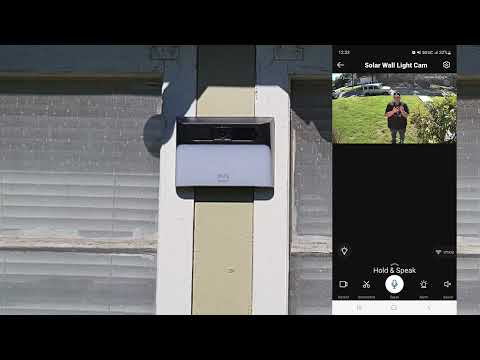
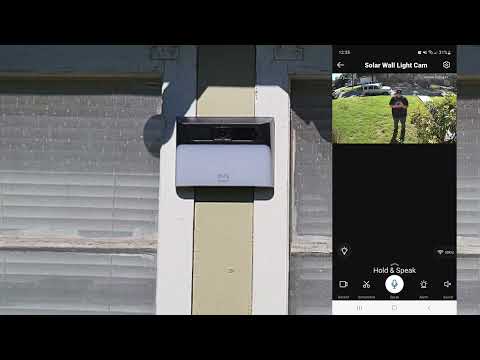
I mounted the camera about 7–8 feet above the ground. From the eufy app’s live view, I could see myself clearly while moving around in the front yard. I liked the video quality from that elevated angle, and the height gave the camera a useful perspective on the approach to the porch.
That elevated position also suits the way I would use an entry camera. Rather than covering only the immediate area beneath it, the S120 could look over the front-yard approach while remaining high enough to be less conspicuous. My nearby window is somewhat hidden, and the camera placement added coverage for that area as well as the porch approach. Your usable view will naturally depend on your wall position, landscaping, and the direction the camera faces.
The live-view screen puts the controls I would use most often within reach. I could turn the light on or off, take a screenshot, and start recording video from the app. Those are basic functions, but it is helpful that they are right there when I am checking an alert or looking at activity outside.
The app also offers stream-quality choices of Auto, 2K, 1080p, and 720p, plus night-vision controls. My firsthand image-quality impression comes from the daytime front-yard view. I did not test night image quality, compare each stream-quality option, or establish how those options change performance in different connection conditions. Still, the available choices give owners a way to select a stream setting rather than being limited to one fixed option.
For buyers focused on the live view rather than only notifications, my experience was positive: I could identify myself clearly as I moved in the yard, and I liked the quality from the higher placement. That is a useful baseline for a porch or entry installation, although it is not a claim about nighttime performance or maximum detection distance.
| Best placement | Sunny porch, entry, or window-adjacent wall |
|---|---|
| Mounting | Separate bracket with pop-on camera and set screw |
| Live-view quality | Clear view in my daytime front-yard check |
| Motion controls | Sensitivity, human detection, other motion, and activity zones |
| Alert options | Light only or loud sound-and-light alarm |
| Initial power | USB-C charge required before installation |
Motion tuning matters most for street-facing placement
The eufy Solar Wall Light Cam S120 has the settings needed to make a camera less generic and more specific to the space it watches. That was the most important part of the setup for me because mine is pointed straight toward the street. If I allowed it to watch every kind of movement in that direction, passing vehicles could create a lot of unwanted events.
In the motion menu, I could adjust sensitivity, enable human detection, manage push notifications, and decide whether other motion should be detected. For my location, I turned off other-motion detection because cars would otherwise be annoying. I also chose to begin around a middle-to-lower sensitivity instead of immediately selecting the most sensitive setting. That approach fits a camera with a street in view: start conservatively, then adjust based on the events you actually want to receive.
There is also an activity-zone control. This lets you identify the portion of the image that matters most to you rather than giving every part of the frame equal priority. For an entry, that might mean prioritizing the walkway or porch approach. It is a useful tool, but it is not a replacement for sensible placement. If a busy street occupies a large part of the frame, sensitivity, detection choices, activity-zone coverage, and camera position all need to work together.
The practical decision here is simple. If you are mounting the S120 to watch a quieter side door or an entry that does not look at traffic, you may have fewer adjustments to make. If the only sensible mounting spot looks toward a road, plan to spend a little time with the motion settings. The app provides the controls for that job, which is better than being forced to accept a one-size-fits-all alert setup.
I did not establish the effective motion-detection range or reliability at my chosen sensitivity, so I would not promise a particular distance or alert result. What I can say is that the available controls made it possible to tailor the system around a real concern in my installation: avoiding car-related activity that I did not want treated as a security event.
Light, alarm, privacy, and audio controls add flexibility
As a wall-light camera, the S120 gives you more to manage than video alone. The light settings include brightness and motion-activated lighting. That makes the product a natural fit for a porch, entry, or path where lighting is useful when somebody approaches. I could control the light through live view, which is convenient when I wanted to manage it directly from the app.
The alarm can be configured as light only or as sound and light together. The combined sound-and-light alarm was very loud in my experience. That can be valuable if you want a highly noticeable alert, but it is not something I would trigger casually, especially at night. Check the selected alert behavior before you need it so you know whether the camera is set for visual notification alone or the much more attention-grabbing combined option.
I also liked having privacy-zone controls. A privacy zone lets you block selected parts of the camera view from recording. This is useful if a section of the image is not one you want included in recordings. The limitation is straightforward and important: a masked area is excluded from coverage. Before creating a privacy zone, think about whether it could hide part of the route a visitor or package delivery might take.
Additional settings include speaker volume, alert volume, notification controls, and a device-restart option. These are the kinds of adjustments that make the camera feel adaptable to a household rather than locked to a single default behavior. I especially appreciate that detection, lighting, privacy, audio, and notifications are all available in the same app environment.
+ Pros
- Lightweight unit that was easy to handle during installation
- Straightforward bracket, pop-on fit, and set-screw mounting system
- Clear live view from roughly 7–8 feet above the ground
- Deep app controls for detection, lighting, video, privacy, audio, and notifications
- Very loud sound-and-light alarm option
- One of the easiest cameras I have set up
− Cons
- Sound-and-light alarm can be startlingly loud if triggered unexpectedly
- Street-facing placement can create unwanted car-related motion events without tuning
- Needs an initial USB-C charge, and a USB-C cable is not included
Choose the recording mode around your available sunlight
The power manager presents three choices: Optimal Battery Life, Optimal Surveillance, and Custom Recording. I selected Optimal Surveillance because my mounting location gets strong direct sunlight and I expected it to receive plenty of solar power. That was a placement-specific choice, not a setting I would automatically recommend for every installation.
Optimal Battery Life records shorter video segments than Optimal Surveillance. That can be a sensible tradeoff when charging conditions are less dependable. If the best viewing angle on your house is shaded, it is worth recognizing that solar performance and recording preferences are connected. A battery-preserving mode may make more sense than attempting to treat a low-sun wall like an ideal solar location.
Custom Recording adds another option for people who want to make their own tradeoffs. I did not establish long-term solar charging or battery performance in my install, so I cannot say how any one mode will perform through changing seasons or weather. I can say that the power manager gives you clear choices rather than hiding the battery-versus-surveillance decision.
My advice is to choose the location first, then choose the power mode. A wall with real direct sun supports the solar idea behind this camera much better than a shaded compromise location. Once the camera is in an appropriate spot, the power manager lets you decide whether your priority is shorter clips intended to help conserve battery, more surveillance-oriented recording, or a custom configuration.
Who should consider the eufy Solar Wall Light Cam S120?
I would consider this camera for a sunny porch, entry, side door, or window-adjacent wall where a combined light and camera is useful. It is particularly appealing if you want app-based live view and prefer having control over motion behavior, light brightness, motion-activated lighting, alarms, privacy zones, video settings, audio, and notifications.
It is also a good match for a DIY buyer who wants a manageable installation. The lightweight unit, separate bracket, pop-on fit, and securing set screw made the process feel simple. The need to charge through USB-C before installation is an extra preparation step, but it is not a difficult one as long as you have a cable ready.
I would be more selective if your only available location receives poor sunlight or directly frames a very busy road. The S120 offers meaningful motion controls, and those controls are one of its strengths. Still, software settings cannot entirely compensate for a poor solar location or a view dominated by traffic. In that situation, make the mounting choice carefully and expect to tune sensitivity, other-motion detection, and the activity zone.
Buyers looking for proof of weather resistance, long-term durability, local-storage behavior, subscription requirements, smart-home integration, or nighttime image quality will need information beyond my setup experience. I did not test those areas. My recommendation is based on the straightforward install, clear daytime live view, strong app-control depth, and the way the available settings address a real street-facing placement concern.
Specs
| Spec | Detail |
|---|---|
| Product | eufy Solar Wall Light Cam S120 |
| Power approach | Solar-powered camera with initial USB-C charging |
| Mounting hardware | Separate bracket and small securing set screw |
| Streaming quality options | Auto, 2K, 1080p, and 720p |
| Detection settings | Sensitivity, human detection, other-motion detection, activity zones |
| Recording modes | Optimal Battery Life, Optimal Surveillance, and Custom Recording |
| Privacy feature | Configurable privacy zones |
| Light controls | Brightness and motion-activated lighting |
| Audio controls | Speaker volume and alert-volume settings |
Scorecard
Simple bracket, pop-on fit, and set screw.
Excellent control over motion, light, privacy, audio, and video.
I could clearly see movement in the front yard.
Strong sun helps; street-facing views need tuning.
Flexible options, though the full alarm is extremely loud.
Frequently asked questions
Is the eufy Solar Wall Light Cam S120 easy to install?
Yes. I found it to be one of the easiest cameras I have set up. It uses a separate mounting bracket, the camera pops onto that bracket, and a small set screw secures it. Plan to charge it through USB-C before mounting it outside, and note that a USB-C cable is not included.
Where should I install the S120 for solar charging?
Choose a location with strong direct sunlight. I mounted mine near the front porch in a spot that receives very strong sun and expected it to get substantial solar power there. I did not establish long-term charging performance, but I would not treat a heavily shaded wall as an equivalent placement.
How should I set motion detection near a street?
Use the available controls to focus alerts on what matters to you. In my street-facing installation, I turned off other-motion detection to avoid car-related events and started sensitivity in the middle-to-lower range. Human detection, push-notification settings, and an activity zone provide additional ways to tune the coverage.
Can the S120 avoid recording part of the view?
Yes. The app includes privacy zones that can block selected portions of the view from recording. Keep in mind that any masked section is excluded from recording coverage, so avoid blocking an area you may later need to review.
Is the alarm loud?
Yes. I found the combined sound-and-light alarm very loud. The app also offers a light-only alarm option, so it is worth checking the selected alert behavior before using the camera at night.
Does Optimal Battery Life record the same way as Optimal Surveillance?
No. Optimal Battery Life records shorter video segments than Optimal Surveillance. That can help preserve battery when solar charging is less dependable, while my high-sun location led me to select Optimal Surveillance.
Final recommendation
The eufy Solar Wall Light Cam S120 is an easy recommendation for a sunny entry where control matters as much as basic camera coverage. I liked its simple bracket installation, clear daytime live view from the elevated position, and the unusually broad set of app controls. It does not force you to accept unwanted motion activity as the price of having an outdoor camera; it gives you sensitivity, detection, activity-zone, and notification settings to shape the experience.
Choose a wall with real direct sun, complete the initial USB-C charge before installation, and give the motion controls a few minutes of attention after mounting. For a porch or entry with a suitable solar location, this is a capable outdoor wall-light camera that was genuinely easy for me to set up.
As an Amazon Associate I earn from qualifying purchases.