USB-C Rechargeable AA Batteries: Worth the Switch?
These USB-C rechargeable AA batteries remove the charging dock from the equation. I found the setup simple: plug each cell into USB power, watch the LEDs, and use them like regular AAs.
Affiliate disclosure: As an Amazon Associate I earn from qualifying purchases. This article may contain affiliate links, which means I may earn a commission at no extra cost to you.
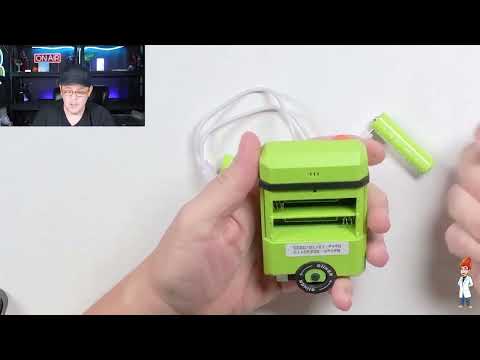
If you are tired of hunting down a dedicated charger every time your household needs fresh cells, USB-C rechargeable AA batteries are a genuinely useful alternative. I used these AA-size cells in a small toy, where they fit in the battery compartment and powered the toy with its lights active. The practical difference is not how they work inside a device: they function like ordinary AAs. The difference is how they recharge. Instead of putting the cells in a separate dock, each battery has its own USB-C input.
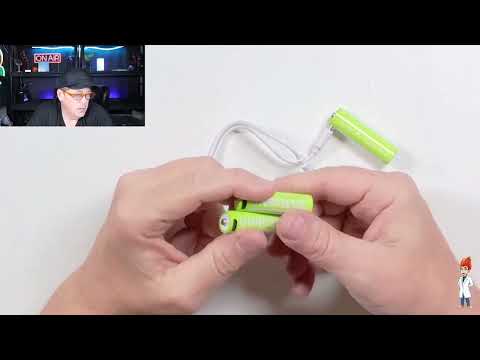
That approach makes the routine feel much less fussy. I connected two batteries to the included dual-ended USB-C cable, connected the cable to power, and watched the onboard indicators flash. When charging is complete, the lights stay solid. For toys, remotes, and other everyday AA-powered items, that direct setup is the reason to consider this style of rechargeable battery in the first place.
A smart, simple pick for everyday AA-powered gear if you want rechargeable cells without keeping a separate charging dock around. The built-in USB-C ports, charge-status LEDs, and two-cell cable make the basic routine easy.
As an Amazon Associate I earn from qualifying purchases.
| Battery type | Rechargeable AA cells |
|---|---|
| Charging method | USB-C input built into each battery |
| Charging status | Flashing LED while charging; solid LED when full |
| Simultaneous charging | Two cells with the included dual-ended USB-C cable |
| Demonstrated use | Powered a standard AA toy |
Why USB-C rechargeable AA batteries are different
Conventional rechargeable AA batteries ask you to manage two things: the batteries and a charger that accepts them. There is nothing inherently difficult about that system, but the charger becomes another household accessory to store, locate, and keep connected when the batteries run down. If it ends up in a drawer, a closet, or a box of old electronics, the convenience of owning rechargeable cells can disappear fast.
These USB-C rechargeable AA batteries move the charging connection onto each individual cell. The USB-C port is built into the battery itself, so the cell becomes the thing you plug in. That is the core design change, and it is more meaningful than it might sound on a product listing. It lets you use familiar USB power sources rather than relying on a dedicated AA charging cradle.
I connected the pair with the supplied dual-ended USB-C cable. The arrangement lets two batteries charge at the same time, which is particularly sensible for devices that use two AA cells together. Rather than charging one cell and then the other, I could connect both batteries, plug the cable into a power source, and leave the pair to charge.
The batteries can be connected to a wall-powered USB source or a portable battery pack. That flexibility is useful because USB power is already common around the house. A wall adapter may be the simplest option near an outlet, while a portable battery pack gives you another place to recharge when a dedicated battery charger is not available. I would still think of the batteries as rechargeable AAs first, not as a replacement for every sort of portable power product.
One point is worth stating clearly because the presence of a USB-C port can create the wrong expectation: this is an input-only port. It accepts power to recharge the AA battery. It does not turn the battery into a miniature USB-C power bank, and it cannot be used to charge a phone, earbuds, or another USB device. Once charged, the battery delivers power in the normal way: installed in a compatible AA battery compartment.
My charging and toy test
I started with a small toy that had an empty AA battery compartment. I inserted the USB-C rechargeable AA batteries, and the toy powered on with its lights active. That was the essential everyday check: the cells physically fit and operated the toy as AA batteries should. The charging port does not change the basic job of the cell once it is in the device.
Afterward, I used the dual-ended USB-C cable to connect two cells at once. Once connected to a power source, the small battery lights flashed. Flashing means the batteries are charging. When the batteries have completed charging, the lights remain solid. That simple visual feedback is a useful part of the design because it gives you an immediate status check without a separate charger display.
I liked that the feedback is on the batteries themselves. With a conventional dock, the charger is usually where you look to see what is happening. Here, the battery carries that information with it. If you are setting up a pair for a toy, you can see their charging state directly at the cells before putting them back in the toy.
There is a straightforward planning point with any rechargeable battery: charge it before you need it. These are not a disposable AA you can pull from a package and replace at the last minute after the old cells are dead. If a device has drained the pair, the batteries need time connected to USB power before they return to use. The built-in charging connection makes that task easier, but it does not remove the need to recharge.
In my use, the setup had none of the extra handling associated with placing batteries into a separate charging station. I did not need to align cells in a dock or keep a larger charger on hand. I connected the cable to the ports, supplied USB power, checked the flashing LEDs, and then used the cells in the toy. For a basic household battery routine, that is a meaningful reduction in clutter and steps.

What dock-free charging changes at home
The strongest reason to choose USB-C rechargeable AA batteries is convenience, not a promise of technical magic. A dedicated charger can be perfectly fine if you already have one organized and use it regularly. But for many homes, AA batteries live in a less orderly world of toy bins, remotes, drawers, and seasonal items. The easier it is to recharge a depleted cell, the more likely it is that the cell will actually be reused.
That is especially relevant for toys and controls that get a burst of use and then sit untouched. I mentioned the familiar household pattern of kids using a control for an hour and then returning to it months later, only to find the batteries dead. With disposable cells, the default response is often to replace and throw away the old pair. With these, the practical next step is to plug the batteries back in and recharge them.
Reusable cells can therefore reduce the need to keep buying and discarding AAs after they are depleted. The exact benefit depends on how many batteries your devices use and how often they run down, but the routine is easy to understand: use the cells, recharge them, and use them again. For someone who mostly relies on a handful of AAs in ordinary household devices, that is a more compelling benefit than owning a bulky charging dock.
The cable is the one accessory you still need to keep track of. It is far smaller than a battery charger, but it is still necessary for the charging routine. I would keep the dual-ended cable in the same drawer as the batteries or alongside the devices that use them. That small bit of organization is what lets the dock-free idea remain convenient instead of becoming a search through a mystery box of cables.
The included cable also gives this product a practical pairing advantage. Two batteries can be charged together, so a two-AA toy or remote can have its cells refreshed as a set. That does not establish anything about charge speed, capacity, or long-term matching between cells, which I did not measure. It simply makes the physical setup for a two-cell device intuitive.
Who should consider these AA batteries
These batteries make the most sense for people whose goal is a simpler rechargeable setup for normal AA-powered gear. Toys are an obvious fit based on my hands-on use, and remotes are another sensible everyday example. The audience is not limited to any one device category; the important common thread is an ordinary AA battery compartment and a preference for charging from USB power rather than managing a separate charger dock.
They are a particularly good match if USB power is already easy to access in your home. You may have a wall adapter near where you store batteries, a powered USB outlet, or a portable battery pack available. The product is designed around that existing ecosystem. Instead of adding another proprietary-looking charging base, it makes use of a connection type many people already recognize.
They are also a good fit for buyers who dislike keeping rarely used equipment. A conventional battery charger can be useful, but it has to be stored somewhere and found when needed. These cells reduce the dedicated hardware to a small dual-ended cable. For a household that wants rechargeable AAs without creating another electronics-storage task, that is the main appeal.
I would not choose them because I expected the USB-C port to power other gadgets. That is not their function. Likewise, I did not test capacity, recharge time, cycle life, performance in high-drain products, or fit in unusually tight battery compartments. If one of those questions is the deciding factor for your purchase, this hands-on use does not answer it. My direct result is narrower but useful: the cells charged through their USB-C inputs and worked normally in the standard AA toy I tried.
The claims and limits worth keeping in perspective
The maker states that one rechargeable AA is equivalent to 1,200 disposable AA batteries. That sounds dramatic, and it is best treated as a manufacturer claim rather than a result I independently established. I did not run long-term cycle testing, compare capacity across repeated charges, or calculate how many disposable batteries a single cell might replace in a particular device.
Real-world battery results can vary with the device, its power demands, how often it is used, and how the cells are maintained. A toy used occasionally is a different situation from a high-drain device used frequently. For that reason, the 1,200 figure should not be read as a guaranteed outcome for every buyer or every use case.
The supported, more modest takeaway is still worthwhile. These are reusable AA cells with a built-in charging input. I was able to charge a pair via USB-C and then use them to power a standard toy. If the alternative in your home is repeatedly replacing dead disposable AAs, the ability to recharge the same cells is the practical advantage.
It is also important not to confuse charging convenience with universally proven compatibility. I confirmed fit and operation in the toy I used. I did not test every AA device, higher-drain electronics, or products with unusually restrictive battery compartments. Buyers with a specific demanding device should keep that boundary in mind rather than assuming one successful toy test covers every AA application.
+ Pros
- No separate AA charging dock is needed
- Built-in USB-C input works with common USB power sources
- Included dual-ended cable charges two cells at once
- On-battery LEDs clearly show charging and full status
- I confirmed the cells fit and powered a standard AA toy
! What to know
- The USB-C port accepts charging power only; it cannot charge other devices
- Charge the batteries before putting them into a device
- Keep the dual-ended charging cable with the batteries so it is ready when needed
Buying decision: simple charging versus a separate dock
If you already own a reliable charger and a collection of rechargeable AAs, this product style is mainly an alternative workflow. You plug the cells in directly rather than placing them in a charging bay. That may not matter to everyone, but it is a real quality-of-life improvement for anyone who sees the charger itself as the annoying part of rechargeable batteries.
For a first rechargeable-AA purchase, the appeal is even easier to understand. There is no separate dock to choose, store, or learn. The charging status is communicated by the battery LEDs: flashing while charging and solid once full. The included cable supports two cells at once. Those are all small details, but together they keep the process close to the way people already charge many modern devices.
My recommendation is to buy this type of battery for everyday convenience. I found the cells easy to connect, easy to check, and functional in the AA toy I tested. The product does not answer the bigger technical questions around capacity and longevity, and I would not base a purchase on the unverified 1,200-disposable comparison alone. But the dock-free USB-C approach is not a gimmick: it solves a familiar household hassle in a direct, understandable way.
Specs
| Spec | Detail |
|---|---|
| Size | AA |
| Recharge input | USB-C port on each cell |
| USB-C function | Charging input only |
| Charge indicator | Integrated LED |
| Cable function | Dual-ended USB-C cable for two-cell charging |
| Power-source options | USB wall power or portable battery pack |
| Manufacturer claim | One cell is equivalent to 1,200 disposable AA batteries; not independently verified |
USB-C rechargeable AA batteries FAQ
Do USB-C rechargeable AA batteries work in regular devices?
Yes, in compatible standard AA devices. I installed these in a small AA-powered toy, and it powered on with its lights active. The batteries are intended to function as ordinary AAs once installed; the USB-C port changes the charging method rather than the basic use inside a device.
How do I charge USB-C rechargeable AA batteries?
Connect a USB-C cable to the port built into each battery, then connect the cable to a USB power source. I used the included dual-ended USB-C cable to connect two batteries at the same time. A wall-powered USB source or portable battery pack can supply the charging power.
What do the charging lights mean?
The battery indicators flash while charging. When charging is complete, the indicators remain solid. That status feedback is built into the cells, so you can check the batteries directly rather than reading a separate charging dock.
Can these AA batteries charge a phone through USB-C?
No. The USB-C port is input only. It is there to recharge the AA battery, not to deliver power to a phone or another USB device. Use the batteries in a compatible AA compartment after they have been charged.
Can I charge two batteries at the same time?
Yes. I used the included dual-ended USB-C cable with two batteries simultaneously. That is convenient for a device that needs a pair of AA cells, because the pair can be connected to power together before going back into the device.
Are these better than every standard rechargeable AA battery?
They are better for buyers who value direct USB-C charging and want to avoid a separate dock. I did not compare their capacity, charging time, cycle life, or high-drain performance with other rechargeable AA options, so I cannot rank them on those broader performance measures.
Does one battery really replace 1,200 disposable AAs?
That is a manufacturer claim repeated with the product. I did not independently verify it through long-term testing. The dependable takeaway from my use is that the batteries are rechargeable and can be reused instead of automatically replacing depleted disposable cells.
Scorecard
Direct USB-C charging removes the dedicated dock.
I found they fit and powered a standard toy normally.
Flashing and solid LEDs make status easy to read.
Charge from a wall source or portable battery pack.
The large disposable-battery equivalence claim was not independently measured.
Final recommendation
USB-C rechargeable AA batteries are worth considering when the dedicated charger is the part of the rechargeable-battery experience you do not like. I found the workflow simple: connect the cells to the two-ended cable, provide USB power, watch for flashing indicators, and use the batteries in a normal AA-powered toy after charging. The toy lit up and operated, which is exactly what I wanted from an AA cell with a more convenient charging system.
The limits are clear, too. The USB-C port is only for charging the battery, the cable needs to remain available, and the cells should be charged before they are needed. I also did not establish recharge time, capacity, long-term cycle life, or performance in demanding devices. Within those boundaries, the product delivers a practical dock-free alternative for toys, remotes, and similar everyday AA gear.
As an Amazon Associate I earn from qualifying purchases.